

Hoş geldiniz · OCaml · Melange · mlx
The Elm architecture for OCaml, compiled like Svelte.
A model, messages, a pure update, a pure view. No hooks, no components with state, no virtual DOM. The view is steeped at build time into a DOM template with holes and a refresh that writes only what changed.
DOM writes to the output: 0
The glass is blown once. Every render just pours the tea.
- of hand-written vanilla JS, geometric mean of nine keyed operations
- ×1.15
- React 18: ×1.70
- gzip JavaScript of the whole benchmark app
- 9.0 kB
- React 18: 45.6 kB
- gzip for the counter app, runtime and Melange stdlib included
- 3.0 kB
- TodoMVC: 14.7 kB
- DOM moves to swap two rows of 1,000
- 2
- React moves 998
The recipe
Four pieces, all of them pure.
update and a pure view in mlx. No hooks and no components with
state: an event handler is a message.
type message = Increment | Decrement | Reset

let update message count =
  match message with Increment -> count + 1 | Decrement -> count - 1 | Reset -> 0

let view count =
  <div className="counter">
    <button onClick=Decrement>(Html.text "-")</button>
    <output>(Html.int count)</output>
    <button onClick=Increment>(Html.text "+")</button>
    <button onClick=Reset disabled=(count = 0)>(Html.text "reset")</button>
  </div>

let () = Option.iter (fun root -> ignore (Program.sandbox ~init:0 ~update ~view root)) root- 1ModelcountAny OCaml value. Immutable, so an unchanged reference is an unchanged value.
- 2MessagesIncrement | Decrement | ResetA variant. An event handler is a message, not a closure over state.
- 3updateupdate message countA pure function from a message and the model to the next model.
- 4viewview countA pure function in mlx, compiled into a template and a refresh.
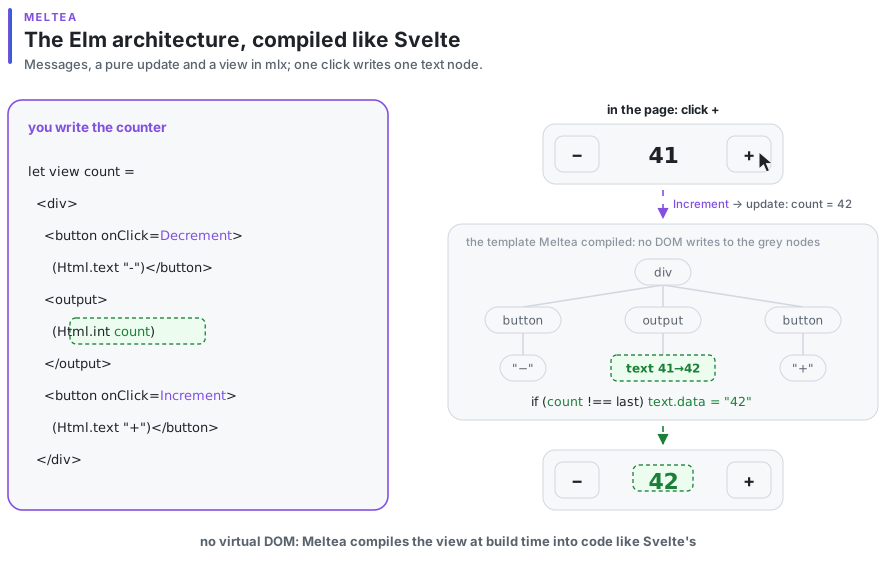
The counter's view compiles to this JavaScript (names shortened):
const template = View.template(Template.html("<div class=\"counter\"><button>-</button>…"),
  (scope, div) => {
    const minus = div.firstChild, output = minus.nextSibling, plus = output.nextSibling, …;
    return [handler_hole(scope, minus, "click"), text_hole({ parent: output, before: null }), …];
  });

const view = (count, dispatch) =>
  View.compiled(template, 2, (scope, holes) => {
    const sent = check(scope, 0, dispatch), counted = check(scope, 1, count); // one === each
    if (sent === Changed) set_handler(holes[0], () => dispatch(Decrement));  // first draw only
    if (counted === Changed) set_text(holes[1], String(count));
    …
});Steeped at build time
The compiler reads your update, so you annotate nothing.
meltea-ppx finds which message writes which field, and which part of the view reads it.
Fields
The compiler reads update and view: which model fields each message can change, which fields the view reads. A message that changes nothing the view reads does not call it.
Fanout alerts
It follows each frequent event to the message it sends, the fields that message writes and the lists that read them. When typing would make a list check all its rows, it says so at the handler.
Remembered values
A derived let at the top of a view is computed again only when a field it reads changed; otherwise it is the same list, and the holes that read it are skipped.
What the alert looks like, at the handler, at build time:
File "todomvc.mlx", line 142, characters 19-44:
142 |            onInput=(fun text -> Retype text)
                         ^^^^^^^^^^^^^^^^^^^^^^^^^
Alert fanout: each input event here sends Retype, which changes editing;
the list at line 187 reads editing, so every input event checks all of its rows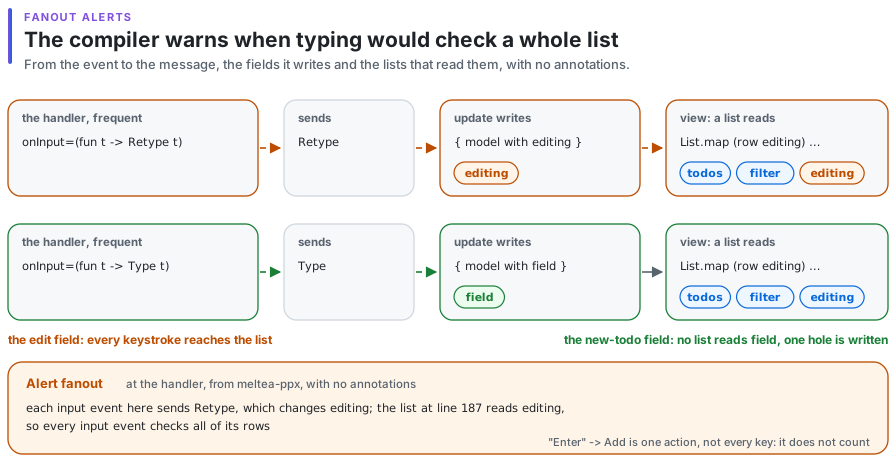
Served hot
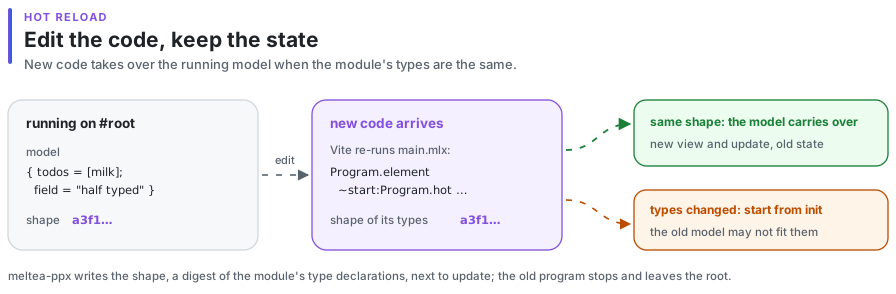
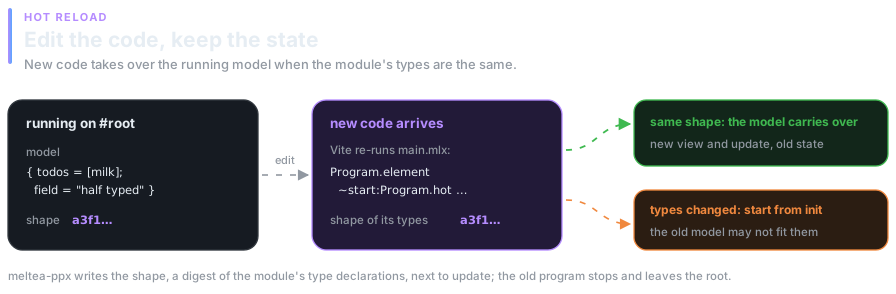
Keep the state while you edit. Render on a server without a DOM.
An edit shows the new view of the old model.
With ~start:Program.hot and Vite's HMR, as elm-watch does. When the module's types changed, it starts from init.
One module, natively or in Node.
Under meltea-ppx -server the same view compiles to code that writes strings, with no DOM. The browser build hydrates the HTML, and clicks and typing made before the code arrives are delivered in order.
(executable                              ; the server, native
 (name server)
 (libraries meltea.server)
 (preprocess (pps meltea-ppx -server)))

(melange.emit                            ; the browser
 (target app)
 (libraries meltea)
(preprocess (pps melange.ppx meltea-ppx -hydratable)))Enter, leave, move. And View Transitions.
As Vue's <Transition> and <TransitionGroup>; Cmd.view_transition from an update draws inside the browser's View Transitions.
let view model =
  <ul className="todo-list">
    (Html.transition_group ~name:"fade" (Html.list (List.map row (visible model))))
</ul>Benchmarks
Within ×1.2 of hand-written JavaScript.
Time, geometric mean of nine keyed operations
Slowdown against hand-written vanilla JS
› Show as a table
| framework | Slowdown against hand-written vanilla JS |
|---|---|
| vanilla JS | ×1.00 |
| Meltea | ×1.15 |
| React 18 | ×1.70 |
JavaScript of the benchmark app
gzip size of all JS in the production bundle
› Show as a table
| framework | gzip size of all JS in the production bundle |
|---|---|
| vanilla JS | 1.4 kB |
| Meltea | 9.0 kB |
| React 18 | 45.6 kB |
Afiyet olsun
Brew your first program.
Add meltea and meltea-ppx to a melange.emit stanza, and (dialect (name mlx) …) indune-project for .mlx files. Until the opam release, pin it.
opam pin add melhole meltea meltea-ppx https://github.com/jongleb/meltea.git(melange.emit
(target app)
(libraries meltea)
(preprocess (pps melange.ppx meltea-ppx)))