

Guide
From a counter to TodoMVC, one glass at a time.
The first glass
A model, messages, update and view.
The model is any OCaml value; here it is an int. Messages are a variant. update is a pure function from a message and the model to the next model, and view is a pure function from the model to HTML, written in mlx.
type message = Increment | Decrement | Reset

let update message count =
  match message with Increment -> count + 1 | Decrement -> count - 1 | Reset -> 0

let view count =
  <div className="counter">
    <button onClick=Decrement>(Html.text "-")</button>
    <output>(Html.int count)</output>
    <button onClick=Increment>(Html.text "+")</button>
    <button onClick=Reset disabled=(count = 0)>(Html.text "reset")</button>
  </div>

let () = Option.iter (fun root -> ignore (Program.sandbox ~init:0 ~update ~view root)) rootNo hooks and no components with state: an event handler is a message. The view compiles to a template with holes and a refresh that writes only what changed, so a click on + writes one text node.
Pouring HTML
Views in mlx.
mlx is OCaml with JSX. Lowercase tags are DOM elements; children in parentheses are OCaml expressions of type Html.t:Html.text, Html.int, Html.float, Html.none, Html.list and Html.keyed.
Attributes are the familiar DOM props (className, value, checked, disabled, …) with their OCaml types; a typo is a compile error that names the element. disabled=(count = 0) is a bool expression like any other.
Ordering
Events send messages.
onClick=Increment sends a message. onInput and onKeyDown take a function of the value or the key,onCheck of the checked state. Handlers are delegated to document, one listener per event type.
value and checked always show the model: after typing, the field gets the model's value back if the update did not take the input. A message sent by a click or a key is drawn at the next microtask; pointer moves, scroll and wheel are drawn once per frame.
A full tray
Lists and keys.
examples/todomvc is the full TodoMVC: routing by #/active and #/completed, editing with Enter, Escape and blur, localStorage through jsonkit's [@@deriving json]. A row:
let row editing todo =
  let text = match editing with Editing { id; text } when id = todo.id -> Some text | _ -> None in
  <li key=(string_of_int todo.id) className=(...)>
    <div className="view">
      <input className="toggle" type_="checkbox" checked=(todo.status = Completed)
        onCheck=(fun _ -> Toggle todo.id) />
      <label onDoubleClick=(Edit todo.id)>(Html.text todo.title)</label>
      <button className="destroy" onClick=(Destroy todo.id) />
    </div>
    (Option.fold ~none:Html.none ~some:(fun text -> <input className="edit" value=text ... />) text)
</li>Html.list (List.map row items) with a key on each row is a keyed loop with selectors: a row is rendered again only when its item is another object or a piece of it that reads outer values changed.
Asking for more
Commands are values.
Cmd and Sub are values that describe effects; Program runs them. An update can return a command:Cmd.message, Cmd.perform for a promise, Cmd.focus for an element by id after the next draw, Cmd.portfor a value out to JavaScript, and Cmd.view_transition to draw the next change inside the browser's View Transitions.Cmd.batch and Cmd.map combine them.
In TodoMVC the update asks for focus with Cmd.focus, main.mlx saves through Cmd.port, and the route comes fromSub.hash.
Listening
Subscriptions.
Sub.every and Sub.hash (the URL fragment) turn the outside world into messages; Sub.batch andSub.map combine them. The compiler reads subscriptions as it reads view: a program asks for them again only after a draw that changed a field they read.
The tea house
Program runs it all.
Program.sandbox ~init ~update ~view root runs a program with no effects. Program.element ~init ~update ~view ~subscriptions root adds commands and subscriptions. dispatch, flush and stop drive a running program from outside.
~start:Program.hot with Vite's HMR shows an edit as the new view of the old model, and starts from init when the module's types changed. ~start:Program.hydrate takes over HTML a server wrote.
Glasses within glasses
Html.map and Html.memo.
Html.map and Html.memo work as in Elm: map turns the messages of a piece of view into the messages of its parent, and memo is Elm's lazy. Laws check that both behave as in Elm.
Graceful
Transitions.
Html.transition ~name and Html.transition_group ~name animate what enters, leaves and moves, as Vue's<Transition> and <TransitionGroup>. The time is ~duration milliseconds, or the element's own animations. The first render does not animate.
let view model =
  <ul className="todo-list">
    (Html.transition_group ~name:"fade" (Html.list (List.map row (visible model))))
</ul>.fade-enter-from, .fade-leave-to { opacity: 0; }
.fade-enter-active, .fade-leave-active, .fade-move { transition: all 200ms; }Served on a server
Server rendering and hydration.
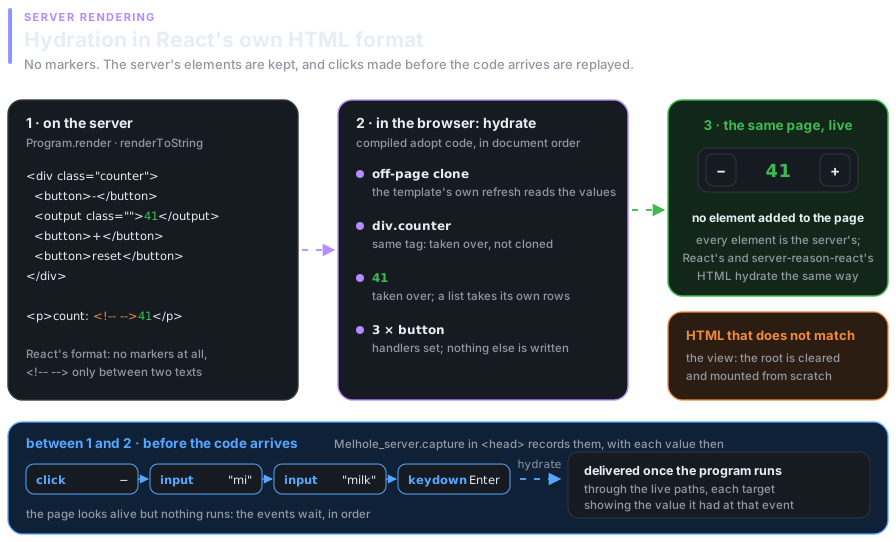
Program.render writes HTML in React's format and ~start:Program.hydrate takes it over in the browser; compile with(pps melange.ppx meltea-ppx -hydratable) to include the code that does it. Melhole_server.capture in the page's head keeps the clicks and typing made before the code arrives, and hydration delivers them.
(* server: the capture script, the model as data, the page *)
"<script>" ^ Melhole_server.capture ^ "</script>" ^ Melhole_server.data ~id:"model" (encode model)
^ "<div id=\"root\">" ^ Program.render ~view:Page.view model ^ "</div>"

(* browser: start from the server's model, no init and no commands run twice *)
Option.iter
  (fun text -> ignore (Program.sandbox ~start:Program.hydrate ~init:(decode text) ~update:Page.update ~view:Page.view root))
  (Melhole.Served.data ~id:"model")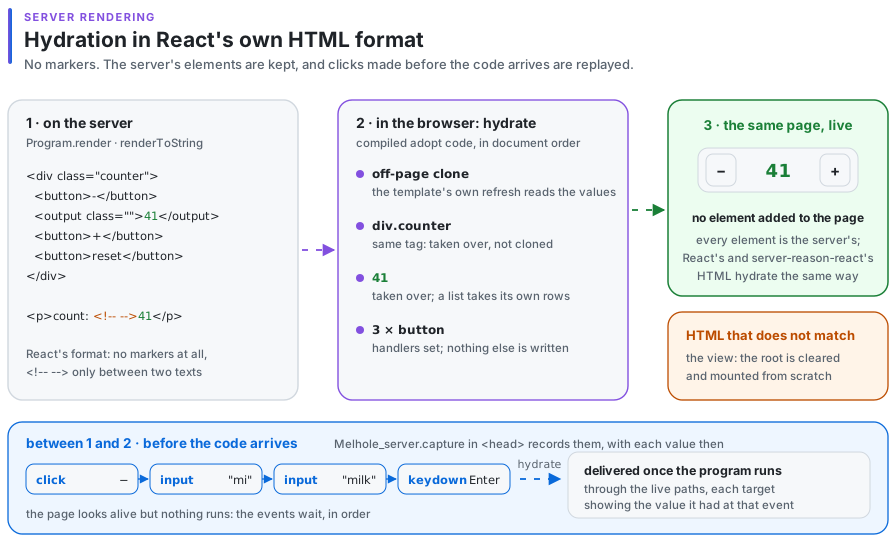
The menu
Four modules.
| module | what it gives |
|---|---|
| Program | sandbox ~init ~update ~view root, element ~init ~update ~view ~subscriptions root, dispatch, flush, stop; render ~view model for the server and ~start:Program.hydrate to take its HTML over |
| Html | text, int, float, none, list, keyed, map, memo (Elm's lazy), transition and transition_group (~name, ?duration) |
| Cmd | none, batch, map, message, perform (a promise), focus (an element by id, after the next draw), port (a value out to JavaScript), view_transition (the next draw inside document.startViewTransition) |
| Sub | none, batch, map, every, hash (the URL fragment) |