

Get started
Brew your first program.
Step one
Pin the packages.
Until the opam release, pin
melhole,melteaandmeltea-ppxfrom the repository.shellopam pin add melhole meltea meltea-ppx https://github.com/jongleb/meltea.gitStep two
Add it to a dune file.
A
melange.emitstanza with the library and the ppx:dune(melange.emit (target app) (libraries meltea) (preprocess (pps melange.ppx meltea-ppx)))and
(dialect (name mlx) …)indune-projectfor.mlxfiles. The repository's owndune-projectdeclares it like this:dune-project(dialect (name mlx) (implementation (extension mlx) (merlin_reader mlx) (preprocess (run mlx-pp %{input-file}))))Step three
Write a model, an update and a view.
onClick=Incrementsends a message.Program.sandboxruns the program on a root element.counter.mlxtype message = Increment | Decrement | Reset let update message count = match message with Increment -> count + 1 | Decrement -> count - 1 | Reset -> 0 let view count = <div className="counter"> <button onClick=Decrement>(Html.text "-")</button> <output>(Html.int count)</output> <button onClick=Increment>(Html.text "+")</button> <button onClick=Reset disabled=(count = 0)>(Html.text "reset")</button> </div> let () = Option.iter (fun root -> ignore (Program.sandbox ~init:0 ~update ~view root)) rootStep four
Build, test and serve it.
In the repository, the examples run under Vite; its config resolves the bare imports Melange emits inside each
_build/…/outputdirectory. With~start:Program.hot, an edit shows the new view of the old model.shell$ dune build && dune test && dune build @runtest-js && npx vitest runshell$ npx vite # then open http://localhost:5173/examples/counter/Step five
Serve it from a server, too.
One module with the model,
updateandviewbuilds for both sides: natively for the server againstmeltea.server, and for the browser with the hydration code compiled in.dune(executable ; the server, native (name server) (libraries meltea.server) (preprocess (pps meltea-ppx -server))) (melange.emit ; the browser (target app) (libraries meltea) (preprocess (pps melange.ppx meltea-ppx -hydratable)))server.ml · main.mlx(* server: the capture script, the model as data, the page *) "<script>" ^ Melhole_server.capture ^ "</script>" ^ Melhole_server.data ~id:"model" (encode model) ^ "<div id=\"root\">" ^ Program.render ~view:Page.view model ^ "</div>" (* browser: start from the server's model, no init and no commands run twice *) Option.iter (fun text -> ignore (Program.sandbox ~start:Program.hydrate ~init:(decode text) ~update:Page.update ~view:Page.view root)) (Melhole.Served.data ~id:"model")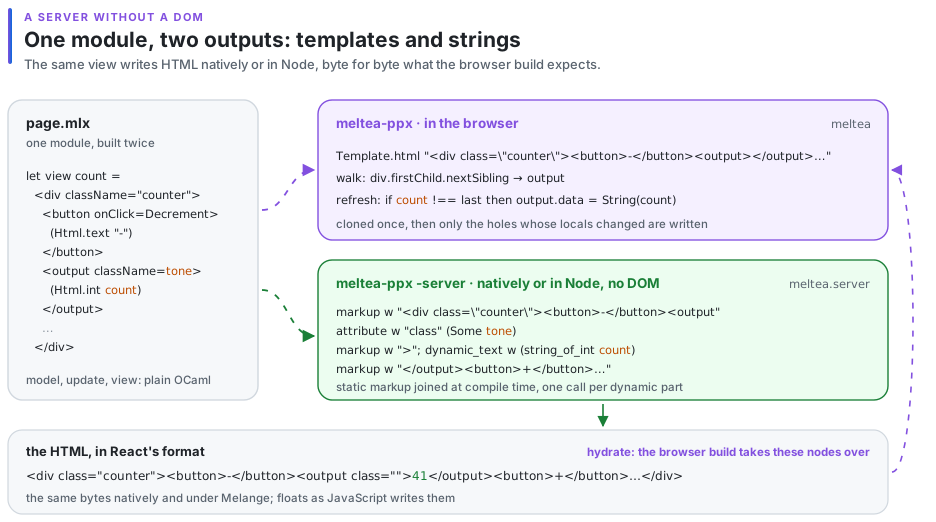
Afiyet olsun.
From here, the guide walks from the counter to TodoMVC: commands, subscriptions, lists, routing and transitions.